The NOL card is one of the most essential tools for smooth and convenient travel across Dubai. Whether you are a resident or a first time visitor, this smart card makes it easy to use the metro, buses, trams and even water transport. To enjoy uninterrupted travel, keeping your NOL card topped up is important. Many people feel confused about where and how to recharge it, especially when they are new to the UAE.
This guide is designed to make the process easy and clear. Here, you will find both online and offline methods so you can choose the option that suits your routine. From quick digital top ups to simple in person recharges, every method is explained in a straightforward way. With the right information, you can travel across Dubai without stress or delays. Let’s explore all the convenient NOL card recharge options available for a smooth journey.
Here are the steps to recharge your NOL card through the RTA website. This is one of the quickest and safest ways to make sure your card always has enough balance for your next trip. The online NOL top up option is easy, fast and works from anywhere.
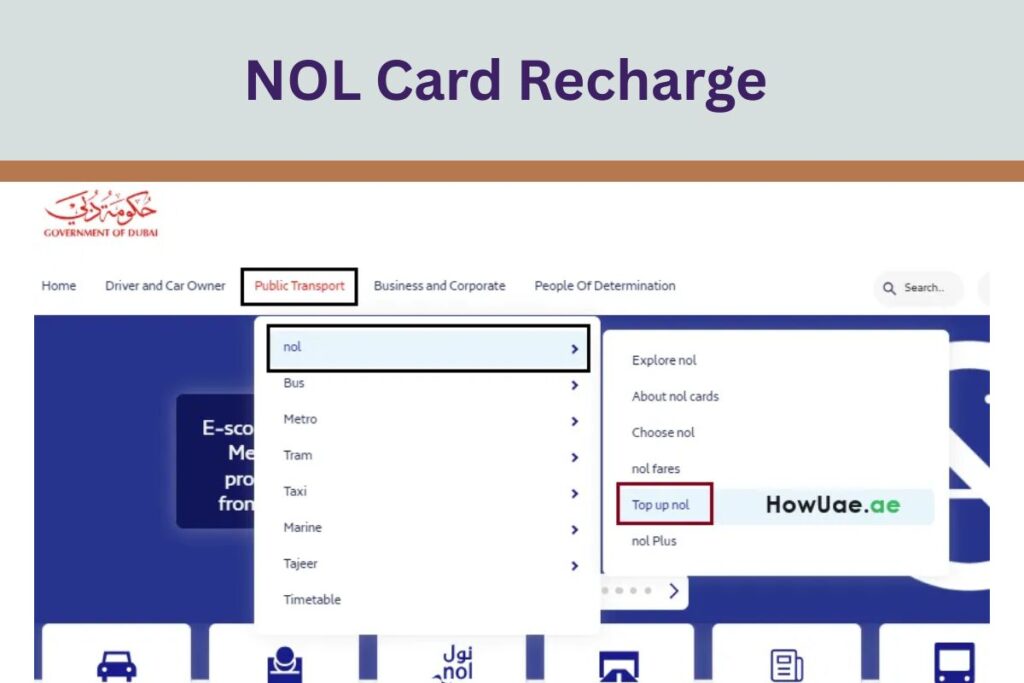
Step 1: Visit the “RTA Website”. Select the Public Transport tab, choose Nol and then click on Top Up Nol.
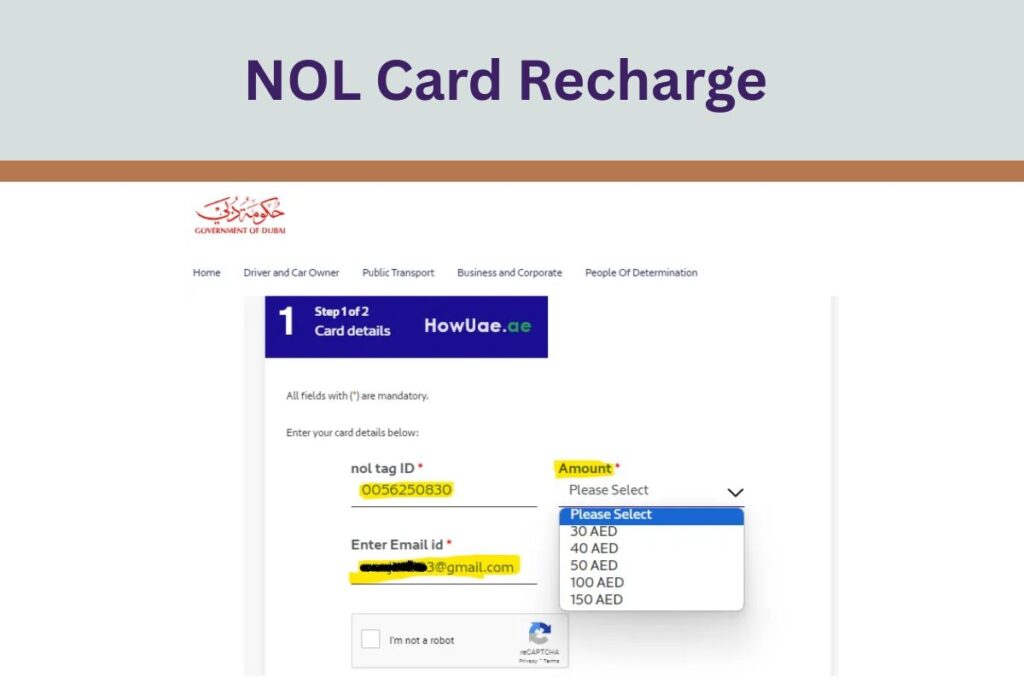
Step 2: Enter your 10 digit Nol Tag ID, your email and the recharge amount. Complete the I am not a robot check.
NOL Card Recharge Through the RTA Website
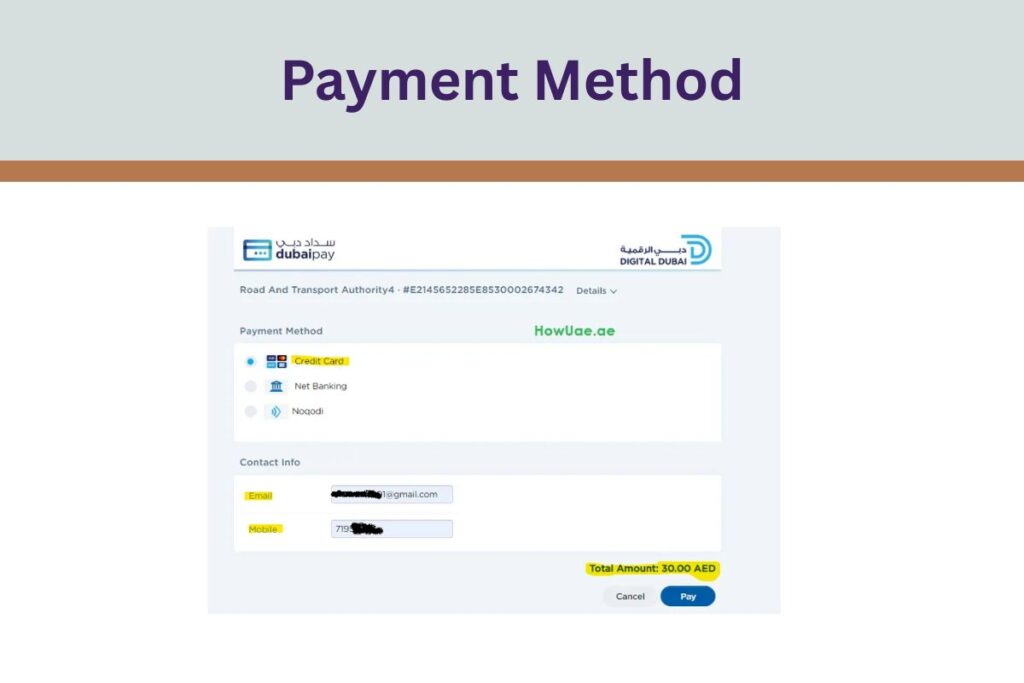
Step 3: Choose a payment method from credit card, net banking or Noqodi and make the payment.
What makes the RTA website convenient is its flexibility. You can recharge from home, office or even while travelling, as long as you have internet. The site supports multiple payment options so your NOL card balance is always ready.
While payment is confirmed instantly, it may take 45 minutes to 4 hours for the balance to show on your card. You can activate it faster by tapping your card at a metro gate, a parking meter or through the Nol Pay app.
Keep your Dubai public transport journeys smooth with a quick NOL smart card top up using the nolPay app. This method is fast, simple and perfect for anyone who prefers digital convenience. Here is the step by step guide in an easy format.
Step 1: Download the nolPay app from the App Store or Google Play. Step 2: Open the app and log in with your registered account or create a new one. Step 3: Tap Add NOL Card on the home screen and link your Nol card. Step 4: Once your card is added, tap Top Up and enter the recharge amount. The minimum amount is 7.5 AED. Step 5: Choose your preferred payment method such as credit card, net banking or an e wallet and complete the payment.
All Done: Your top up is processed instantly and the updated balance appears immediately on your NOL card. This seamless method ensures you are always ready to travel across Dubai without any delay.
NOL Card Top Up using RTA Dubai App
The RTA Dubai App, with over one million downloads, is one of the easiest ways to recharge your NOL card. You can top up anytime and anywhere without standing in queues. Here are the simple steps to follow.
Step 1: Download the RTA Dubai App from the App Store or Google Play. Step 2: Open the app and log in with your registered account or create a new one. Step 3: On the home screen, tap on Services. Step 4: Select Nol and then choose Top Up Nol Card. Step 5: Enter your Nol Tag ID or scan your Nol card using the app. Step 6: Choose the recharge amount and pay using your credit card, wallet or net banking.
This method is quick, secure and convenient, making it perfect for daily commuters in Dubai. With just a few taps, your NOL card is ready for smooth travel across metro, buses and trams.
NOL Card recharge using the S’hail App
The S’hail app makes recharging your NOL card simple and quick. Designed for modern commuters, it allows you to top up your card in just a few taps. Here is the easy step by step guide to help you use the app.
Step 1: Download the S’hail app from the App Store, Google Play or Huawei AppGallery. Step 2: Open the app and log in with your registered account or create a new one. Step 3: On the home page, tap on NOL Card. Step 4: Tap on Top Up once your card is linked and enter the amount. The minimum top up amount is 7.5 AED. Step 5: Follow the in app payment steps to complete your transaction.
This method saves you time and offers full flexibility. You can recharge your NOL card at home, at work or while travelling. It has never been easier to keep your card ready for your next trip across Dubai.
Enable NFC on your phone for even faster top ups. Just tap your device on the supported reader at select RTA stations or partner stores to complete the recharge instantly.
Recharge NOL Card at Bus And Metro Stations
Recharge NOL Card at Bus And Metro Stations
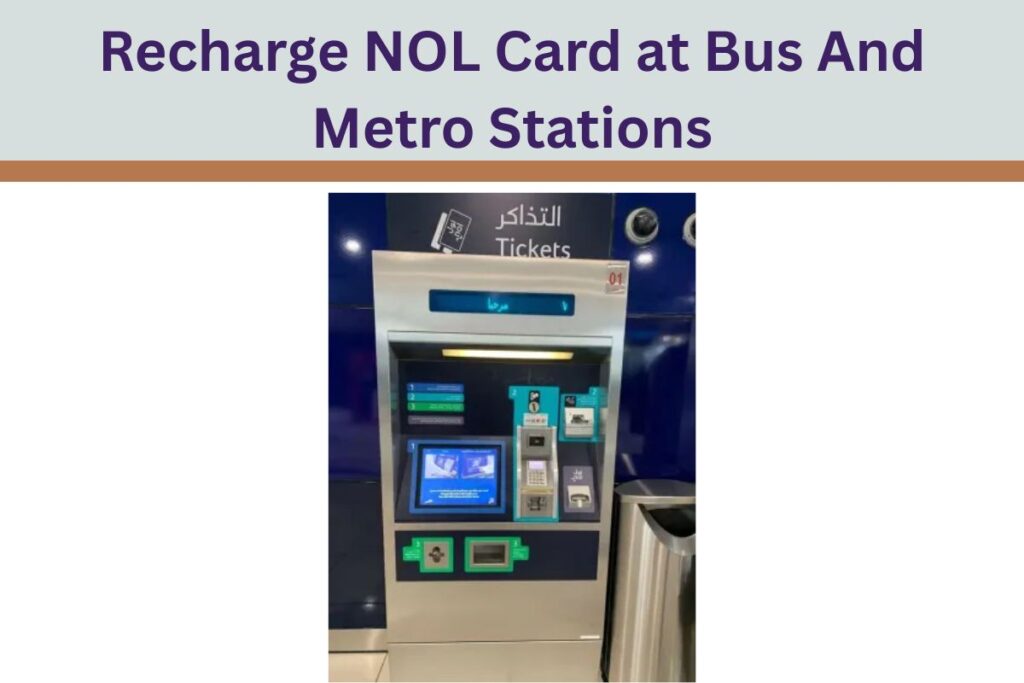
If you use public transport daily, topping up your NOL card at metro and bus stations is one of the fastest and simplest options. These vending machines make it easy to add balance before or after your journey. Here is a clear step by step guide to help you recharge your NOL card using ticket vending machines.
Cash Payment Method Step 1: Find the NOL card top up kiosks at metro or bus stations. Look for the NOL logo. Step 2: Insert your NOL card into the slot on the kiosk. Step 3: Select the top up amount from the options shown on the screen. Step 4: Insert cash into the cash slot based on the amount you selected. Step 5: Take your NOL card and collect the receipt for your payment.
Contactless Payment Method Step 1: Tap your NOL card on the NFC reader available on the kiosk. Step 2: Choose the top up amount on the screen. Step 3: Pay using your contactless credit card, debit card, e wallet or Apple Pay. Step 4: Confirm your payment on the screen. Step 5: Collect your NOL card and keep the receipt for reference.
Top Up Your NOL at Supermarkets or Stores
This method is a practical option when you are out running errands or prefer a face to face top up. Many supermarkets and convenience stores in Dubai offer authorized NOL card recharge services. Here is a simple step by step guide to help you.
Step 1: Look for “authorized NOL card top-up agents and machines in selected supermarkets and convenience stores across Dubai. Step 2: Tell the cashier that you want to recharge your NOL card. Step 3: The cashier will let you choose between two top up methods: Cash Top Up or POS Payment.
Option 1: Cash Top Up Hand your NOL card to the cashier. Tell them the amount you want to add, with a minimum of 7.5 AED. Pay the exact cash amount. Receive your NOL card back along with a printed receipt.
Option 2: POS Payment Tap your NOL card on the reader provided by the cashier. Tell them the amount you want to add. Pay using your contactless credit card, debit card or e wallet. The cashier will confirm the payment and give you a receipt.
This method is convenient and makes it easy to top up while shopping or doing daily tasks.
Things to Keep in Mind About Nol Top Up
Before recharging your NOL card, it is helpful to know the minimum top up amount, maximum balance limits and how long online top ups take to activate. Here is the information in a simple and clear format.
Minimum Top Up The minimum amount you can add to your NOL card is 7.5 AED.
Maximum Balance Anonymous NOL cards can hold up to 1,000 AED. Registered NOL cards can hold up to 5,000 AED.
Online Top Up Activation When you recharge online, it may take between 45 minutes to 4 hours for the balance to show on your card. If you want to activate the balance sooner, tap your NOL card at a metro gate, an online parking meter or use the nol Pay app.
Knowing these limits and activation times helps you manage your NOL card easily and ensures smooth travel across Dubai.
Conclusion
In short, topping up your Dubai NOL card is simple and convenient. You can recharge online through the RTA website, nolPay app or S’hail app, or choose offline options at metro stations, bus stations and local supermarkets. Each method is easy to use and helps you stay prepared for your daily travel.
Keeping an eye on your NOL card balance ensures smooth movement across Dubai. Using a NOL card on metro trains, buses and trams also helps you save money by reducing taxi expenses and lowering your overall transport cost.
So go ahead and recharge your card on time. Whether you are travelling for work or exploring the city, a well topped NOL card keeps your journey stress free and ready for anything Dubai has to offer.
1. How do I recharge my Nol card online? You can easily recharge your Nol card online through the RTA website. Just visit the RTA Nol page, enter your card details, choose the recharge amount, and make the payment using a debit card, credit card, or e-wallet. The process is quick and secure, and you can do it anytime without visiting a metro station.
2. How can I check my Nol card balance? You can check your Nol card balance in a few simple ways. Tap your card at metro station gates or use balance checkers at bus stations. You can also download the RTA, S’hail, or Nol Pay app and add your card to view the balance instantly.
3. What is the minimum balance required on a Nol card? The minimum balance you need on your Nol card to travel is AED 7.50. If your balance goes below this amount, the system may stop you from entering the metro or bus, so it is better to recharge on time.
4. How do I transfer money to my Nol card? There is no option to directly transfer money to a Nol card. What you can do is top up the card using online platforms, metro stations, ticket machines, or mobile apps. Once you add the amount, tap your card at a validator to activate the balance.
5. Can two people use the same Nol card? No, two people cannot use one Nol card for travel. Each person must have their own card with enough balance. Sharing a card can cause fare issues and may also lead to penalties, so it is always better to use separate cards.
6. How long does a Nol card top-up take? If you recharge online or through an app, the payment goes through instantly, but the balance may take 45 minutes to 4 hours to reflect. To activate it faster, tap your card at a metro gate, parking meter, or use the Nol Pay app for instant activation.
7. What is the maximum limit of a Nol card? Anonymous Nol cards can store up to AED 1,000. If you register your card, the storage limit increases to AED 5,000, which is helpful for frequent travelers who prefer larger top-ups.
Asma Khan is the founder of ArabAirSports.com, a platform focused on delivering sports news, updates, and related information. His aim is to provide accurate, timely, and easy-to-read sports content for readers.